Clearer drawing tools with familiar keyboard shortcuts
The 2D toolbar has a cleaner icon family and keyboard shortcuts shown in contextual help. Hold Space to pan temporarily, and open the keyboard reference from the toolbar or with ?.
Try the keyboard tools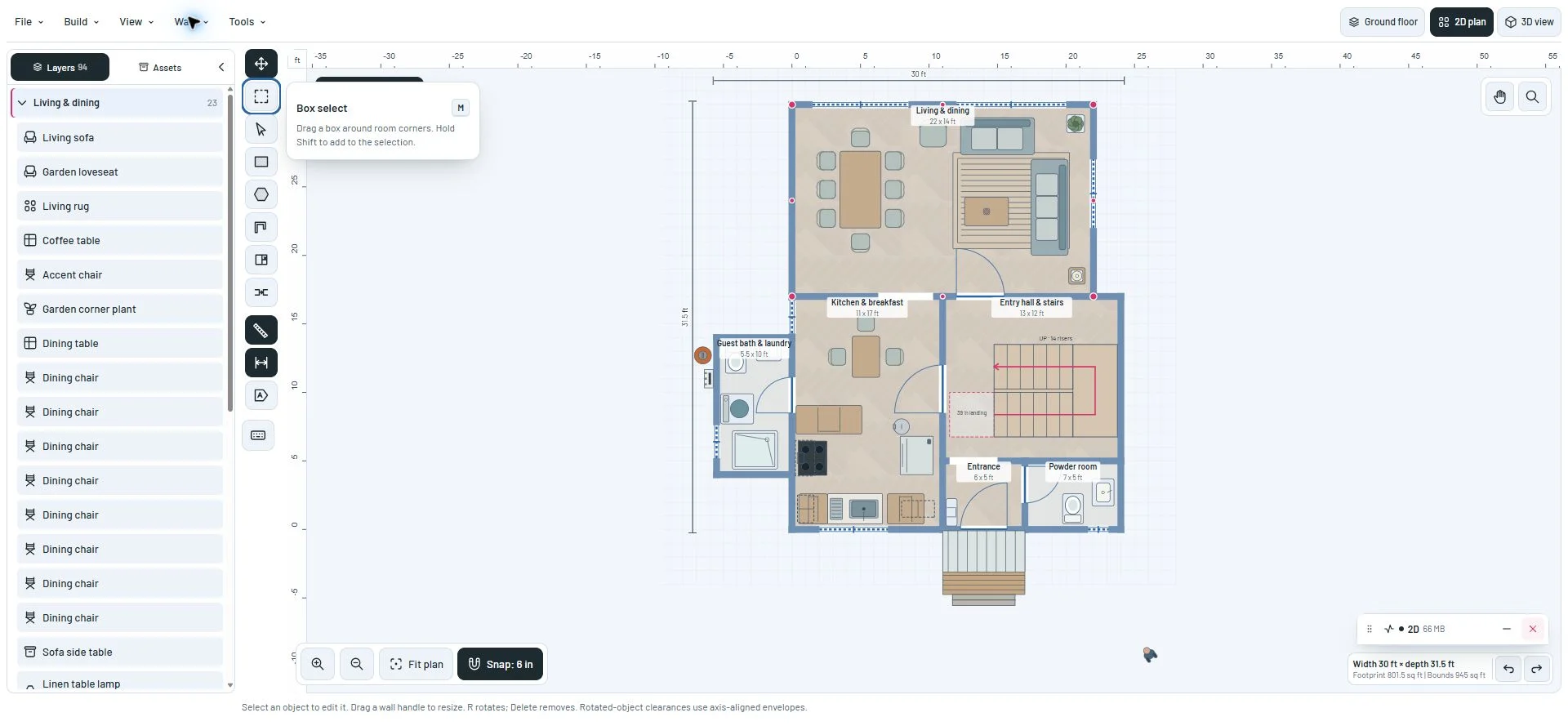
Recognize the tool before you draw
Move uses four directional arrows, box selection a dashed area, and vertex editing a direct-selection pointer. Rectangle and polygon tools use clear shape silhouettes. Rulers, guides and labels remain together in the vertical toolbar.
Hover or focus a tool to see its action and key. The keyboard button opens a scrollable reference on desktop and phones.
Keep your drawing tool while navigating
U selects rectangular rooms and Shift+U cycles rectangle and polygon. P starts an open wall, C cuts a room, O adds a wall opening, H pans and Z zooms. Hold Space on the canvas to use the Hand tool temporarily; releasing it returns to your previous tool and preserves an unfinished wall chain.
Ctrl/Command+R toggles rulers, Ctrl/Command+; toggles dimension guides and Ctrl/Command+Shift+H toggles labels. Undo, Redo, Select all corners and Deselect have documented shortcuts. The bindings apply in the 2D workspace and pause in text fields, menus and dialogs. V now selects objects; vertex editing moves to A.
This milestone was documented on October 24, 2026 and added to the public history on October 24, 2026 at 12:33 AM GMT-3. Screenshots show the development state at the time. About this alpha history.